* Estimated delivery times start from the date of shipment, excluding processing time.
* Actual delivery times may vary due to holidays, weather conditions, or customs delays.
Usafirishaji wa kawaida bila malipo kwa maagizo zaidi ya $9.9
Sera ya Kurudisha
Rudisha bidhaa zitakubaliwa ndani ya siku 40 tangu tarehe ya kupokea bidhaa. Bidhaa zilizobuniwa haziwezi kurudishwa au kubadilishwa. Bidhaa zilizonunuliwa na kadi ya zawadi ya elektroniki zinaweza kubadilishwa tu; rudi pesa haifai.
Zawadi ya Bure
Karibu Roymall, tovuti yako ya kitaalamu ya kununua zawadi za hifadhi ya duka. Tunathamini na kushukuru msaada wako, na tunataka kuonyesha shukrani yetu kwa kuongeza kipengele cha msisimko wa ziada kwa ununuzi wako. Unaponunua nasi, sio tu utapata bidhaa za hali ya juu zinazoboresha maisha yako, lakini utapata pia zawadi ya bure ya kipekee kwa kila agizo lako. Tayari kuchunguza mkusanyiko wetu na kupata zawadi zako kamili? Chunguza uteuzi wetu wa bidhaa za hifadhi ya duka, weka agizo lako na subiri msisimko wa zawadi yako ya bure kufika pamoja na ununuzi wako.
Sera ya Usafirishaji
Tutafanya kazi kwa bidii kukufikishia bidhaa baada ya kupokea maagizo yako na kuhakikisha zinafika salama. Maelezo ya uwasilishaji yatakuwemo kwenye barua pepe yako ya uthibitisho.Kwa hali ya kawaida, maagizo huchakatwa ndani ya siku 2. Katika hali maalum, yanaweza kucheleweshwa kama ifuatavyo: Unapoagiza Jumamosi, Jumapili au siku za likizo, itacheleweshwa kwa siku 2.Kwa kawaida, inahitaji siku 5-7 za kazi (Jumatatu hadi Ijumaa) bila kuathiriwa na ucheleweshaji wa ndege au mazingira mengine.Kwa sababu huduma yetu ya usafirishaji ni kimataifa, muda wa uwasilishaji utategemea eneo lako, kwa hivyo inaweza kuchukua muda na tafadhali subiri kwa subira ikiwa uko katika wilaya au nchi za mbali.
1. Sera ya Kurudisha na Kubadilisha
Tunakubali tu bidhaa zilizonunuliwa kutoka roymall.com. Ikiwa unanunua kutoka kwa wasambazaji wetu wa ndani au wauzaji wengine, huwezi kuzirudisha kwetu.Bidhaa za mauzo ya mwisho au zawadi za bure hazikubaliki kwa kurudisha.Ili kuwa na haki ya kurudisha, bidhaa yako lazima isitumike na iwe katika hali ileile uliyoipeleka. Pia lazima iwe kwenye pakiti ya asili.Baada ya kupokea maagizo ya kurudisha kutoka kwetu, tafadhali pakiti bidhaa zako zilizorudishwa na kuacha kifurushi chako kwenye ofisi ya posta ya ndani au mtoa huduma mwingine wa usafirishaji. Tutachakata bidhaa yako ya kurudisha au kubadilisha ndani ya siku 3-5 za kazi baada ya kuipokea. Rudi pesa itachakatwa na kuwekwa kiotomatiki kwenye njia yako ya awali ya malipo.Hakuna kurudisha au kubadilisha kunaweza kukubaliwa ikiwa bidhaa ilitengenezwa kwa maagizo maalum, ikiwa ni pamoja na saizi maalum, rangi maalum au uchapishaji maalum.Ikiwa unahitaji msaada zaidi, tafadhali wasiliana nasi. service@roymall.com au Whatsapp: +447549870296
2. Sera ya Kurudisha Pesa
Utapata rudi pesa kamili au stoo 100% ya stoo baada ya kupokea na kukagua kifurushi kilichorudishwa. Rudi pesa itachakatwa kiotomatiki kwenye njia yako ya awali ya malipo.Tafadhali kumbuka kuwa gharama za usafirishaji na ushuru wowote au ada hazirudishiwi. Gharama za ziada za usafirishaji hazirudishiwi mara tu kifurushi kimetumwa. Wewe ndiye mwenye jukumu la kulipa ada hizi na hatuwezi kuziacha au kuzirudisha, hata kama agizo litarudishwa kwetu.Mara tu tutakapopokea na kuthibitisha bidhaa yako iliyorudishwa, tutakutumia barua pepe kukujulisha kuwa tumepokea bidhaa yako. Pia tutakujulisha kuhusu uthibitisho au kukataliwa kwa rudi pesa yako.Ikiwa una shida yoyote kuhusu mchakato wa kurudisha pesa, tafadhali wasiliana nasi. service@roymall.com au Whatsapp: +447549870296
Good product. Note: if you use 3.3V supply and 3.3V logic level it works fine, but if both of the supply voltage and the logic level is 5V it will not work. So if you want to use it with a 5V system, the logic levels must be reduced down to about 3V.
I think this part should be included in the description page because the current description is misleading.
Good product. Note: if you use 3.3V supply and 3.3V logic level it works fine, but if both of the supply voltage and the logic level is 5V it will not work. So if you want to use it with a 5V system, the logic levels must be reduced down to about 3V.
I think this part should be included in the description page because the current description is misleading.
Good product. Note: if you use 3.3V supply and 3.3V logic level it works fine, but if both of the supply voltage and the logic level is 5V it will not work. So if you want to use it with a 5V system, the logic levels must be reduced down to about 3V.
I think this part should be included in the description page because the current description is misleading.
Product as description. Tested ok working as expected. Tested the touchscreen and is very accurate after fine tuning of parameters. Need to use the proper library which is easy to find on github. Good product. Recommend.
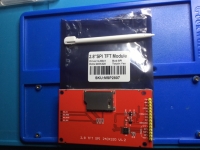
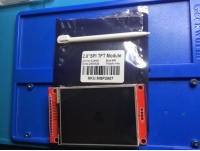
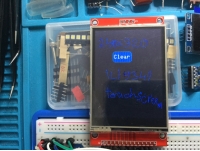
Tips:For questions about your order, place of delivery, product discount, taxation, delivery time, warranty, shipping, payment, exchange rate, and other questions unrelated to the product, please contact customer service.
showing 1-30 of 35|
Show Original
A part of the QA has been auto-translated.
0
Q:
How should I use this display and the available drivers? I've been trying to use it with the Adafruit_ILI9341 library and I only get a white screen.
Hi, Yes it is RoHS compliant according to the manufacturers datasheet
Answered by xcomseller on 14/09/2021Helpful (0)
0
Q:
how can I use the touch with a EP32 - is there somewhere an example do use the TFT and the touch with Arduino IDE. In the download file from Banggood I see only a st Board.
Trythis library: ***** and choose PDQ_ILI9341 Load the sample code and there is also a wiring diagram for the mega.
Answered by BG111045417 on 06/02/2021Helpful (0)
0
Q:
Tested literally everything you can find on google about this screen. ALWAYS WHITESCREEN Adafruit_ILI9341.h graphicstest Serial output is: ILI9341 Test!
Display Power Mode: 0x0
MADCTL Mode: 0x0
Pixel Format: 0x0
Image Format: 0x0
Self Diagnostic: 0x0 The screen is just not being recognized. Is this an error with my libraries or is this fking thing just broken? Spent 4h of my life and reached nothing - close to try solving the problem with a hammer.
Tested literally everything you can find on google about this screen. ALWAYS WHITESCREEN Adafruit_ILI9341.h graphicstest Serial output is: ILI9341 Test!
Display Power Mode: 0x0
MADCTL Mode: 0x0
Pixel Format: 0x0
Image Format: 0x0
Self Diagnostic: 0x0 The screen is just not being recognized. Is this an error with my libraries or is this fking thing just broken? Spent 4h of my life and reached nothing - close to try solving the problem with a hammer.
should ne usable with a raspberry pi, it's an spi connection. Look at adafruit ILI9341 library, for thé touchscreen not sûre of which library you can use, but look after xpt2046 + raspberrypi on google, i'm quite sure that a library exists already :)
Ipersonally don't know, but it seems so. Search YouTube for "nterface TFT display with STM32 in parallel mode || CubeIDE || CubeMX || HAL" (I am not allowed to link directly, sorry)
Answered by mylists on 12/12/2020Helpful (0)
0
Q:
Good afternoon, do you have a notbuk lg400 screen?
Hi, I have this TFT SPI Touch Display ILI9341, program Arduino 1.6.5., and developement board STM32F103C8T6. And I need initialize the display.I have program, but all Power Mode, MADCTL Mode is 0xFF !!! on output.WHERE I HAVE PROBLEM ?????my code is :#include <Adafruit_GFX.h> // this line I have added#include "SPI.h"#include "Adafruit_GFX_AS.h"#include "Adafruit_ILI9341_STM.h"// For the Adafruit shield, these are the default.#define TFT_DC PA0 // (Green) #define TFT_CS PA1 // (Orange) #define TFT_RST PA2 // (Yellow)// STM32 - TFT// 5v - VCC// GND - GND// PA0 - DC// PA1 - CS// PA2 - RST// PA5 - SCK// PA6 - MISO// PA7 - MOSI// 5v - LED AAdafruit_ILI9341_STM tft = Adafruit_ILI9341_STM(TFT_CS, TFT_DC, TFT_RST); // Use hardware SPI void setup() { Serial.begin(115200); Serial.println("ILI9341 Test!"); tft.begin(); // read diagnostics (optional but can help debug problems) uint8_t x = tft.readcommand8(ILI9341_RDMODE); Serial.print("Display Power Mode: 0x"); Serial.println(x, HEX); x = tft.readcommand8(ILI9341_RDMADCTL); Serial.print("MADCTL Mode: 0x"); Serial.println(x, HEX); x = tft.readcommand8(ILI9341_RDPIXFMT); Serial.print("Pixel Format: 0x"); Serial.println(x, HEX); x = tft.readcommand8(ILI9341_RDIMGFMT); Serial.print("Image Format: 0x"); Serial.println(x, HEX); x = tft.readcommand8(ILI9341_RDSELFDIAG); Serial.print("Self Diagnostic: 0x"); Serial.println(x, HEX); Serial.println(F("Benchmark Time (microseconds)")); Serial.print(F("Screen fill ")); Serial.println(testFillScreen()); delay(500); Serial.print(F("Text ")); Serial.println(testText()); delay(3000); Serial.print(F("Lines ")); Serial.println(testLines(ILI9341_CYAN)); delay(500); Serial.print(F("Horiz/Vert Lines ")); Serial.println(testFastLines(ILI9341_RED, ILI9341_BLUE));